Built for pharmacies in Bangladesh
Sales, stock and expiry —
in one place, made simple.
Fast bills at the counter, the right batch picked automatically, and a Telegram alert in the morning when stock runs low. One branch or many — it works the same simple way.
- Nothing to install
- Medicine catalog included
- Works on phone and tablet
Not in stock — try another name
For each medicine, the batch that expires first was picked automatically
Bill created
INV-MRP-261109-0001 · ৳
Receipt sent to the printer; stock reduced.
Just a sample — medicines and prices are examples; nothing is really sold.
About 25,000
Bangladeshi medicines already in the catalog
FEFO
First to expire, first to sell — automatically
Many branches
Shops and warehouses, with transfers between them
9 AM
Low-stock list on Telegram
The real software
Take a look inside
Pick a screen from the tabs below. Every picture is a real RaiqaRX screen.
Tap the picture to enlarge · 1/10
The counter billing screen
Sales → New sale
- Search by brand, generic or company — F2 jumps to the search box
- Vial, Tablet — any unit; type 10*napa to add 10 at once
- Cash, bKash, Nagad or due — enter the amount received and change is worked out
- Hold (F8) and Save & print (F9) — a whole bill without the mouse
Tap the picture to enlarge · 2/10
80 mm thermal receipt
Sales → Receipt
- Pharmacy name, address and licence number at the top
- Invoice number, date, who sold it, customer
- Return policy printed on the receipt
Tap the picture to enlarge · 3/10
The whole business at a glance
Sales → Dashboard
- Net sales, bills, average bill — compared with the previous period
- Busiest hours and a daily sales chart
- “Needs attention” before a fast seller runs out
- Stock at risk of expiry, dues and sales by staff
Tap the picture to enlarge · 4/10
Who owes what, on one page
Sales → Customer dues
- Total outstanding, number of customers, dues older than 30 days
- Find customers by name or phone
- Tap Collect to take money — part payment is fine, the rest stays on account
- Money goes to the oldest bill first
Tap the picture to enlarge · 5/10
Stock, expiry and low stock on one page
Inventory → Dashboard
- Value of stock on the shelf — at cost and at retail price
- Expiry watch: expired, within 30, 60, 90 days
- Medicines below their reorder level
- Latest stock movements
Tap the picture to enlarge · 6/10
Stock in new goods in 3 steps
Inventory → Quick Purchase
- Pick supplier → add medicines → save
- Search about 25,000 catalog medicines; add your own if missing
- Drafts save automatically
- Pay in full or in part — it shows what’s left to pay
Tap the picture to enlarge · 7/10
Check your own branches before spending
Inventory → What to buy
- Everything below reorder level in one list
- If another branch has spare, it says which branch and how many
- Stock already on the way shown apart — no double buying
- Only if nobody has it: “Need to buy”
Tap the picture to enlarge · 8/10
Full details for every medicine
Inventory → Products
- Generic, manufacturer, form, catalog MRP
- Indications, dosage, side effects, storage — all in one place
- Your own settings: category, reorder level, controlled drug
Tap the picture to enlarge · 9/10
Stock moving between branches
Inventory → Stock → Transfers
- “Coming to me” and “Sent by me” in separate tabs
- From where to where, how many units, what status
- Cancel before it’s received and stock returns to its batch
Tap the picture to enlarge · 10/10
You decide who sees which page
User Management → Menu access
- Pick a role, pick a module, tick the boxes
- Turn every page of every module on or off
- Telegram and prescription scan by role in the Features tab
Who are you? See how much easier your day gets
Pick one.
Know what’s happening without being at the shop
- All branches on one dashboard
Today’s sales, cash and dues — a row for each branch.
- You decide what staff can see
Create roles and tick their menus and features.
- Low stock on Telegram every morning
Know what to buy without going to the shop.
Stock and purchasing from one place
- “What to buy” page
Low stock: bring it from another branch if one has it, otherwise it goes on the buy list.
- Quick purchase
Find medicines in the catalog and stock in with batch, expiry and price.
- Expiry watch
Batches expiring soon, right on the dashboard.
The right medicine, the right batch
- Search by generic
If a brand is out, shows in-stock brands with the same generic.
- Controlled drugs
Marked medicines ask for prescription details at sale.
- Expired stock can’t be sold
No risk of handing out an expired batch by mistake.
Fast bills even at rush hour
- A few letters finds the medicine
Type, tap, enter quantity — done.
- Hold a bill
Pause one bill and serve the next customer.
- Sell on due
Pick the customer and bill on due; the balance keeps itself.
What you get
Everything a pharmacy needs, in one software
Each part has its own menu. Show staff only the menus for their job.
Sales & POS
Type a name or generic, sell by strip or piece, hold bills, print receipts.
Details →Stock & batches
Quantity, cost and MRP for every batch. The batch expiring first is sold first.
Details →Expiry watch
Batches expiring soon on the dashboard. Expired medicines can’t be sold.
Details →Purchases & suppliers
Quick purchase page, supplier list, and choosing which branch receives goods.
Details →Customers & dues
Who owes what and where — payments settle the oldest bills first.
Details →Users & roles
Owner, manager, pharmacist, salesman — each sees only the menus for their job.
Details →Start in three steps
No typing in a medicine list — find it in the catalog and enter just the cost and quantity.
- 1
Open an account
Enter the pharmacy name, address and owner’s email. The main branch is created for you.
- 2
Stock in what you bought
Find medicines on the purchase page and enter batch number, expiry and selling price (MRP).
- 3
Start selling
Give staff their roles. They log in and start billing.
Multi-branch
Several shops and warehouses, one set of books
Try it on the right: switch branch, then send stock from the warehouse to Mirpur and receive it.
- Each branch has its own stock, sales and cash
- See other branches’ stock; work only in your own
- Separate invoice numbers per branch, with the branch address on receipts
- Just one shop? You won’t see any branch settings at all
Working in:
pcs
All branches (view only):
Transfer TR-0012 · Warehouse → Mirpur-10 · 100 pcs
- Sent
- In transit
- Received
Automatic alerts
Know on your phone before stock runs out
Scan the QR code on your profile once. Every day at 9 AM you get the list of medicines running low — only the roles you turn it on for. Expired batches don’t count as stock.
Tap through it on the right. Below is the real bot.
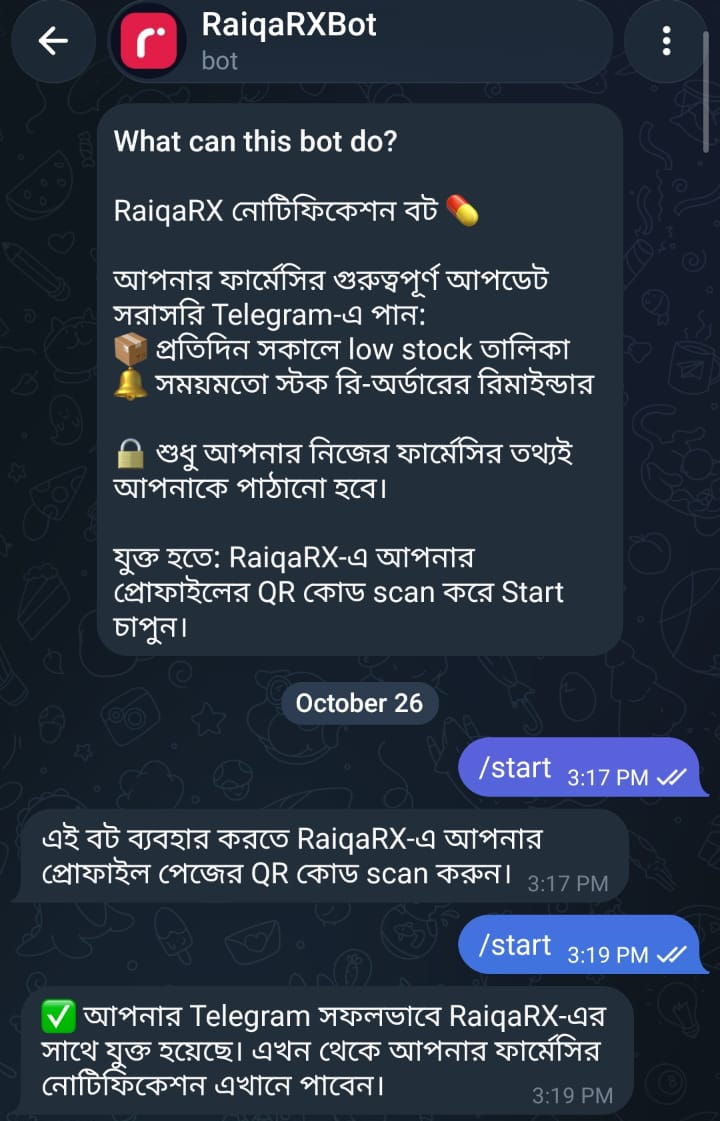
RaiqaRX Bot
9:00 AM
- Paracetamol 500 mg — 12 left, level 30
- Omeprazole 20 mg — 4 left, level 30
- Salbutamol Syrup — 2 left, level 5
Plans that fit your shop
Monthly price, no hidden costs. Build your package on the pricing page and see the price.
Basic
One person, one shop
৳ 1,500 /month
1 user · 1 branch · sales & stock (limited)
Standard
A small team, one shop
৳ 2,000 /month
5 users · 1 branch · users & roles
Pro
Pharmacies with several branches
৳ 6,000 /month
10 users · 3 branches · all modules · add-ons
Enterprise
Large pharmacies and chains
৳ 12,000 /month
40 users · 3+ branches · custom reports · all add-ons
Common questions
Do I need to install anything?
No. It runs in the browser — on a computer, laptop or tablet. You just need internet.
Do I have to build the medicine list myself?
No. About 25,000 Bangladeshi medicines are already in the catalog. You can add your own if one is missing.
Can my staff see everything?
No. For each role you decide which menus and features it gets.
What if I have several branches?
Each branch keeps its own stock, sales, dues and cash. You can transfer between branches, and the owner can see all branches together.
Where is my data kept?
All your pharmacy’s data is stored on secure cloud infrastructure. Your data belongs to your business, and only authorised users can see it. All communication with the software happens over secure (encrypted) connections. We never sell your data or share it with third parties.
See for yourself how it works in your pharmacy
Tell us about your shop on a call and we’ll suggest the right plan.